What is an SDK ?
An SDK (Software Development Kit) is a set of tools a third-party developer can use in developing their application using a certain framework or platform. In the case of Flutter an SDK would be a single package or a collection of packages that provide certain functionality eg a service to a Flutter application.
Difference between an SDK and API
An API (Application Programming Interface) is a set for protocols/rules that define how different applications communicate and share data, whilst an SDK is a tool kit to build applications and features.
How to build a Flutter SDK
What is a Flutter package ?

Lets begin by understanding what a Flutter package is, a Flutter package is a pre-built collection of code that adds functionality and features to your Flutter app. The act as building blocks that are reusable and modular, allowing developers to reuse existing code instead of building everything from scratch. These packages could be widgets, icons, utilities, assets and more.
Flutter packages are added to a Flutter application through the pubspec.yaml file through the dependancies section:
dependencies:
  flutter:
    sdk: flutter
  ming_cute:
    path: packages/ming_cute
  cupertino_icons: ^1.0.2
  go_router: ^13.0.1
  provider: ^6.1.1
  graphql_flutter: ^5.2.0-beta.6
  json_annotation: ^4.8.1
  flutter_svg: ^2.0.10+1
For the keen eyed, you must have noticed that we have flutter as an SDK listed in the dependencies. Yes, Flutter is an SDK as it provides different tools and utilities to build and compile a Flutter application.
Setting up a Flutter package
Create the Package
flutter create --template=package my_packageThis is a Flutter CLI command that creates a new Flutter-compatible Dart package.
Understanding the files structure
In Flutter applications the main.dart file holds the main entry point for the application through the main() function. All app execution begins from this function. Since packages don’t require executing independently whenever the application starts. They don’t hold a main() entry point. Packages however, contain their own central file with the same name as the package. eg if your package is named ming_cute_icons then the file is called ming_cute_icons.dart.
So then, whats the point of this file ?
A package contains several classes and files to achieve the functionality that it is meant to perform. However, not all of these classes and methods need to be exposed. Some things may even need to be specifically hidden. The main purpose of the central file is to define what files from the package are exposed to the app. The file may also expose other packages that it imports.
Let’s assume this is our package structure for a hypothetical calculator package: simple_calc
lib/
├─ simple_calc.dart
├─ src/
│  ├─ calculator.dart
│  ├─ utils/
│  │  ├─ math_utils.dart
│  ├─ models/
│  │  ├─ number_model.dart
Building Flutter packages
In this structure, simple_calc.dart file is our central file. We may want to expose the calculator class and the number_model.dart, but not the math_utils.dart. We use the export keyword for exposing files to the app.
For this, the simple_calc.dart file will look like this:
export 'calculator.dart';
export 'models/number_model.dart';
You do not need to specifically hide anything if you do not want to expose it. All files not exported are hidden by default. You can use the show and hide keywords to only show certain things or hide certain things respectively. For example, let’s say we only want to show the calculator class from the calculator.dart file and hide an ImaginaryNumber class from the number_model.dart.
This is how we would write the mentioned scenario:
export 'calculator.dart' show Calculator;
export 'models/number_model.dart' hide ImaginaryNumber;
Something to note is that the general convention when creating packages is to add a src folder inside the lib folder that includes everything except the central file. This allows separation between the central file and the package’s source code.
pubspec.yaml
In general, the pubspec.yaml file in an app is a combination of metadata about a project and the dependencies it imports. The pubspec.yaml belonging to a package is similar to one that belongs to an app but contains different metadata compared to an app and certain added restrictions for dependencies.
Since the file is a YAML file, it contains various properties about the package. Let’s review some of the possible properties you can set in the file. This may not be an exhaustive list; however, these are some of the main properties used when creating a package.
name: simple_calc
description: A simple calculator package for Flutter and Dart.
version: 1.0.0
homepage: https://github.com/yourusername/simple_calc
repository: https://github.com/yourusername/simple_calc
issue_tracker: https://github.com/yourusername/simple_calc/issues
documentation: https://github.com/yourusername/simple_calc/wiki
publish_to: https://pub.dev

environment:
  sdk: ">=3.0.0 <4.0.0"
  flutter: ">=3.10.0"

dependencies:
  flutter:
    sdk: flutter

  # Add any other package dependencies here
  math_expressions: ^2.2.0

dev_dependencies:
  flutter_test:
    sdk: flutter
lints: ^3.0.0- name: Defines the name of the package. This is the name that will show up in pub.dev when a package is published.
- version: Defines the version of the package. Flutter allows various kinds of versioning systems, such as a normal version number (”1.0.0”), a patched version (”1.0.0+2”), or even a different tag that can be released as a pre-release(”2.0.0-beta.1” / “2.0.0-dev.1”).
- description: Adds a description of the package functionality that is the main description line below the package name on pub.dev.
- repository: The repository field, which is not mandatory, includes the URL of your package’s source code repository. If you decide to publish your package on pub.dev, the main page will display the repository URL. Although it’s not required, we encourage you to furnish either the repository or homepage (or both) as it aids users in comprehending the origin of your package.
- homepage: This URL should link to the website for your package. In the case of hosted packages, this URL is accessible from the package’s main page.
- issue_tracker: The optional
issue_trackerfield should feature a URL directing to the package’s issue tracker, helping users view existing bugs and file new ones. In cases whereissue_trackeris absent but the repository is present and directs to GitHub, the pub.dev site defaults to using the issue tracker at the repository issues page. - documentation: Some packages have a dedicated site for hosting documentation, distinct from the primary homepage and the API reference generated by pub.dev. Include a documentation field containing the respective URL if your package includes supplementary documentation. Pub will display a link to this documentation on your package’s main page.
- publish_to: By default, packages are published to pub.dev. You can use the
publish_toto publish your packages to another custom server or stop publishing anything altogether.
Publishing
When you finish implementing the functionality within your Flutter package, it’s time to publish.
 Before you publish, here are a few steps we (and pub) recommend following:
- Format your code with the pubspec formatter (
dart format). - Run the
panacommand to check and analyse anything wrong with your package. - Check you have your LICENSE file set (for your first time uploading), and your
CHANGELOG.mdandpubspec.yamlare updated with the newest changes.
To publish a Flutter package, you can simply run the following command in your package:
flutter pub publishHowever, before you do, its recommended doing a dry run for your publish by adding the same flag:
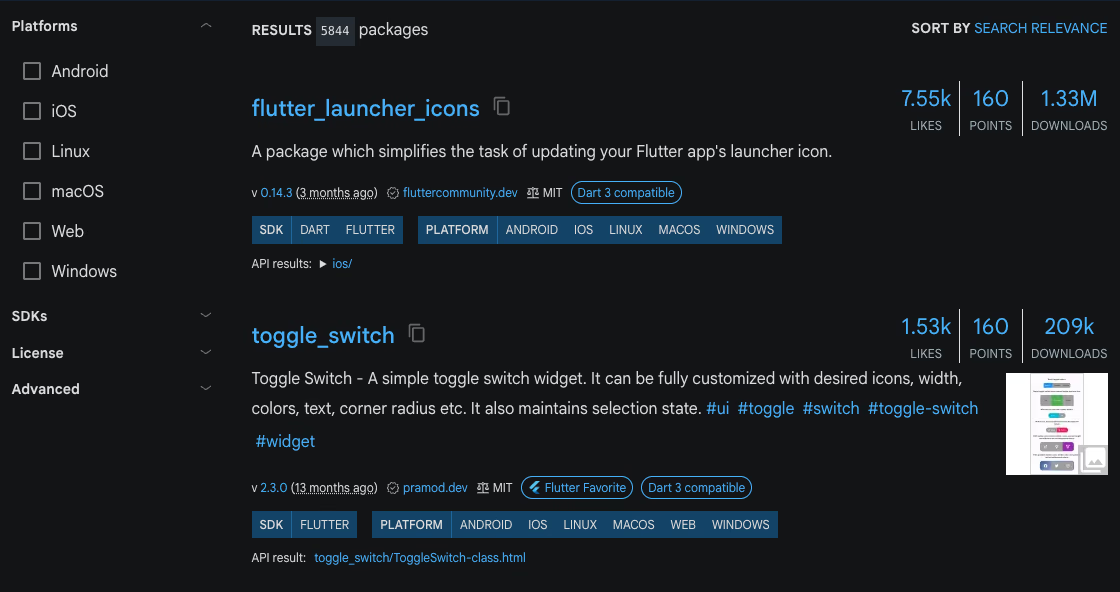
flutter pub publish --dry-runAfter this you will get to see your package on Google’s pub.dev such as these:
 Note that you can use a package without publishing it to pub.dev - this is done through importing a package from GitHub like so:
dependencies:
    packageA:
      git:
        url: https://github.com/flutter/packageA.git
Conclusion
Creating a Flutter package is a great way to increase the adoption of your service by making integration simple and seamless for other developers. Whether you’re working as an individual developer or part of a team, packaging your code can save others from facing the same challenges you’ve already solved. By sharing your solution, you contribute to the wider developer community and help accelerate app development. I’ll be documenting the full process of building and publishing a Flutter package soon, and I’m also considering open-sourcing the project to encourage collaboration and feedback.